
At a glance
Work out what has actually stopped
“The smart meter is broken” can describe three different problems. The fixed gas meter may have stopped recording, it may still record correctly but no longer send readings, or the separate in-home display may have lost its connection. Those faults look similar from the sofa but need different responses.
Ofgem says a smart meter that stops being smart can continue to measure energy accurately. In that case you can read it manually while the supplier works on the communications problem. A blank, damaged or error-marked meter is different from an in-home display that has gone offline.
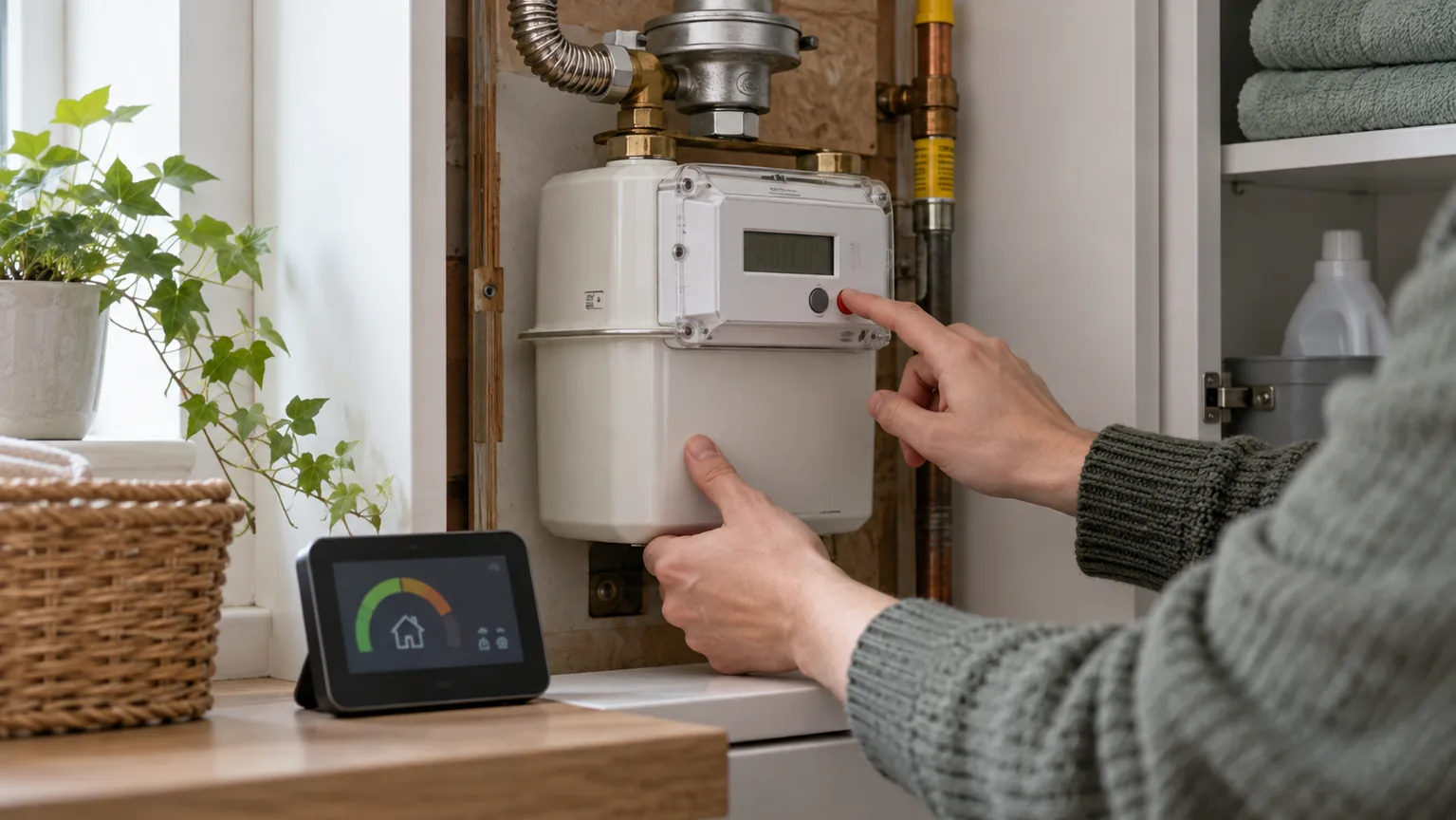
The portable display is not the meter. It is an optional screen showing information received from the metering system. Your gas meter is fixed to a wall or board, often in a cupboard or an outside box. Do not open its casing, move it or interfere with pipework.
The quickest useful check is on your bill
Look at the latest meter-reading section. Citizens Advice notes that an estimated reading is often marked with the word “estimated” or an “E”. If recent bills have switched from actual or smart readings to estimates, the supplier may no longer be receiving automatic data.
Compare the billed reading with the number on the fixed gas meter. You are not trying to make them identical—the bill may cover an earlier date—but the current meter should normally be higher than a genuine earlier reading. A large mismatch, the wrong meter serial number or a reading that moves backwards deserves a prompt call to the supplier.
Check the billing period as well. An online account that has not updated today does not by itself prove the meter has failed, so compare the reading history across recent bills before reporting the problem.
Take a manual smart gas meter reading safely
Meter button sequences vary by make and model. Use the guide on your supplier’s website for the meter in front of you. In general, wake the fixed meter’s screen and find the total gas reading in cubic metres. Record the whole-number digits and ignore digits after the decimal point when the supplier’s instructions tell you to do so.
Take a photograph that includes the display and, if possible, the meter serial number. Keep the date. Submit the number through the supplier’s app, website or phone service and save the confirmation. Our gas meter guide explains how to distinguish the fixed meter from its display and how traditional metric and imperial readings differ.
Do not keep pressing unfamiliar controls if the display shows an error, battery warning or instructions to call for help. Note the exact message and report it. Never remove seals or covers.
What to tell your supplier
Give the supplier a concise fault history: when automatic readings appear to have stopped, which bills are estimated, the current manual reading and whether the fixed meter or only the in-home display is affected. That is more useful than reporting that “the screen is broken” without saying which screen.
Ofgem says suppliers must take all reasonable steps to ensure smart meters automatically send readings. It also says they must take all reasonable steps to obtain a reading from you at least once a year. Ask the supplier to confirm whether it can communicate with the gas meter and whether an older first-generation meter is awaiting a remote upgrade.
Continue sending manual readings at sensible intervals until the account shows actual readings again. This reduces the chance of estimates drifting away from real usage, especially across a price change.
- Bill evidence: dates of the first estimated readings and copies of affected statements.
- Meter evidence: current reading, photograph, serial number and any error message.
- Display detail: say whether the fixed meter, in-home display or both are affected.
- Desired outcome: corrected readings, investigation of smart communications and an appointment if hardware needs attention.
Keep the bills grounded while you wait
A communications fault does not mean the gas is free, and it does not necessarily mean the meter is measuring incorrectly. Keep a simple dated reading log. When a bill arrives, compare its closing reading with the log before focusing on the pounds-and-pence total.
If the supplier replaces estimates with an actual reading, the next bill may contain a catch-up adjustment. Check which tariff rates were applied to each period. Use our gas bill calculator with your own dates and tariff, or follow the worked calculation if you want to audit the arithmetic.
If a long run of estimates produces a charge for much older consumption, the separate back-billing rules may become relevant. They do not automatically cancel every adjustment, so check the dates and earlier bills.
Know when this is not a smart-reading problem
Loss of gas supply, a smell of gas or concern about unsafe pipework is not a data troubleshooting job. In Great Britain, call the National Gas Emergency Service immediately on 0800 111 999 if you smell gas. Move away from the suspected leak and follow the emergency operator’s instructions.
For an unresolved meter or billing complaint, use the supplier’s formal complaints process. Ofgem cannot investigate an individual complaint, but Citizens Advice can help and the Energy Ombudsman can review eligible cases after eight weeks or deadlock.
This guide describes Great Britain’s smart-meter arrangements. Northern Ireland’s metering system and consumer routes differ, so use local supplier and Consumer Council guidance there.
Gas price cap FAQs
Will a smart gas meter still measure gas if it stops sending readings?
It can. Ofgem says a meter that loses smart functionality may continue to measure usage accurately. Take manual readings and contact the supplier to diagnose the communications fault.
Is the in-home display the smart meter?
No. The display is the portable screen that shows information. The actual meter is fixed to a wall or board and is the preferred place to take a manual reading.
How can I tell whether my gas bill is estimated?
Check the reading section for the word “estimated” or an “E” beside a reading. Suppliers format bills differently, so ask yours if the status is unclear.
Who is responsible for fixing smart gas meter communications?
Contact your energy supplier. It can check whether the meter is communicating, arrange an appointment where needed and explain any first-generation meter upgrade.
Should I keep submitting readings after reporting the fault?
Yes, if the supplier is not receiving them automatically. Regular manual readings help keep bills aligned with actual use until smart operation returns.
Sources
Rates and rules checked on 1 October 2026. Time-sensitive figures should be checked again before use.